The Sitecore XP Technical Debt Audit: Six Domains That Decide Your Migration Cost
A clear, practical audit that exposes the real technical debt holding XP back and shows enterprises how to fix it before migration becomes painful.


The short answer
Sitecore XP technical debt, not XP itself, is what makes modernization slow and expensive. This audit scores six domains: content architecture, personalization and xDB, search and indexing, custom code and pipelines, multi-site complexity, and DevOps maturity. Multi-site is the costliest, adding 40 to 80 percent to migration. Score each domain and you have a defensible readiness number for leadership.
XP Isn't Dead, But Your Technical Debt Might Be Killing You
Most Sitecore audits I encounter are general best-practice checklists. This one is XP-specific and built around measurement: what increases modernization cost, what blocks migration, and what creates lasting risk. I built it from real enterprise XP audits, and I score every domain the same way each time so the results are comparable across engagements.
I spend a lot of time inside legacy Sitecore XP installations. Some still run surprisingly well. Others look stable on the surface but are quietly drowning in technical debt, built up over years of rushed releases, staff turnover, and architectural shortcuts.
If you are still on XP, the platform is not your biggest problem. The real threat is the debt around it, which determines whether modernization is smooth or a budget-breaking ordeal.
Across the XP audits I have run, organizations that addressed debt early cut their projected migration cost by roughly thirty to sixty percent. A structured audit gives leadership a clear picture of readiness and extends the life of existing installations.
Before the audit itself, it's worth understanding the pressures that make XP harder to maintain today than when most of these platforms were built.
Key Takeaways
- Technical debt, not XP itself, is what makes modernization slow and expensive.
- Six domains drive most XP migration risk: content architecture, personalization and xDB, search, custom code, multi-site complexity, and DevOps maturity.
- Multi-site complexity is the costliest single domain, adding forty to eighty percent, and it stacks with the others rather than replacing them.
- A zero to twenty scorecard per domain, totaling out of 120, gives leadership a shared and quantifiable view of readiness.
- Enterprises can cut debt now, short of migrating to an enterprise headless CMS, using the roadmap below.
- Teams without in-house XP expertise close these gaps faster by bringing in Sitecore upgrade services that have run the migration before.
What Changed Around XP
Infrastructure cost on self-managed hosting
In every XP audit I run, infrastructure cost is one of the first red flags. XP requires a heavy footprint: CM, CD, SQL, Solr, xConnect, and Identity servers, all of which must be patched, monitored, scaled, and secured.
Cloud providers have shifted pricing toward consumption billing, and long-running Windows VMs, SQL licensing, storage, and bandwidth have all become significantly more expensive. I have seen XP customers spend more on infrastructure in a single year than XM Cloud would cost over three.
One client had a Solr cluster that required manual failover. Another had SQL servers two versions behind, because upgrading them would break custom pipelines. These are not theoretical; I see them in audits every month.
XP's cost curve goes up. XM Cloud's goes down. Staying on XP is a financial liability, not just a technical decision.
The talent pool moved to headless and SaaS
The XP talent pool is shrinking, not because developers cannot work on XP, but because the ecosystem has moved on. Sitecore's roadmap prioritizes XM Cloud, headless SXA, Next.js, TypeScript, GraphQL, and SaaS-native services.
In my audits, I often meet teams who inherited XP from developers who left years ago. The people maintaining the platform today are working with legacy MVC controllers and .NET Framework, paired with Solr and xDB patterns that modern Sitecore work no longer requires.
This is an economic and ecosystem shift, not a capability gap. If your team lacks deep XP experience, bringing in a partner who has already run an XP to XM Cloud migration usually closes the gap faster than training up on a shrinking skill set.
Zero Trust expectations XP was never built to meet
Security expectations have changed dramatically. Enterprises now operate under Zero Trust models with continuous compliance, automated patching, container isolation, secret rotation, cloud-native identity, and real-time threat detection as baseline expectations, not extras. XP was not built for any of this.
In one audit, I found an Identity Server instance that had not been patched in four years, because updating it would break a custom login flow. In another, xConnect ran on an outdated Windows Server version no longer receiving security updates.
Organizations end up bolting on compensating controls and manual patch cycles just to meet baseline expectations, and every year the gap widens. XM Cloud offloads nearly all of this to Sitecore's managed SaaS environment. What it does not offload is the surface that decoupling creates in its place. Access tokens, preview endpoints, webhooks, and edge caching now sit between the content store and the front end that renders it. Headless CMS security works through that surface and its hardening checklist.
The pressures every XP team already knows about
These issues are familiar to every XP team I work with:
- Solr overhead: custom schemas, computed fields, fragile indexing dependencies
- Legacy personalization tied to xDB: years of accumulated rules and custom facets
- Custom pipelines that introduce unpredictable behavior and resist refactoring
- Multi-site architectures with shared templates that are hard to separate
XP can still run well. It's the debt built up over years of rushed deployments that makes modernization difficult.
What This Audit Deliberately Ignores
Some items commonly mentioned in agency XP audits do not need to be covered here: GlassMapper, TDS, Unicorn, and custom MVC frameworks. These are implementation-specific choices, not part of the XP platform itself, and none of them survive migration to XM Cloud, which replaces all server-side code and MVC patterns with a new headless front end.
Because they do not influence cost, complexity, or architectural risk, they are not relevant here.
The Six Domains
This audit framework breaks XP technical debt into six domains. Each domain contains specific indicators that reveal modernization risk and migration cost. This is the same structure I use in real enterprise audits.
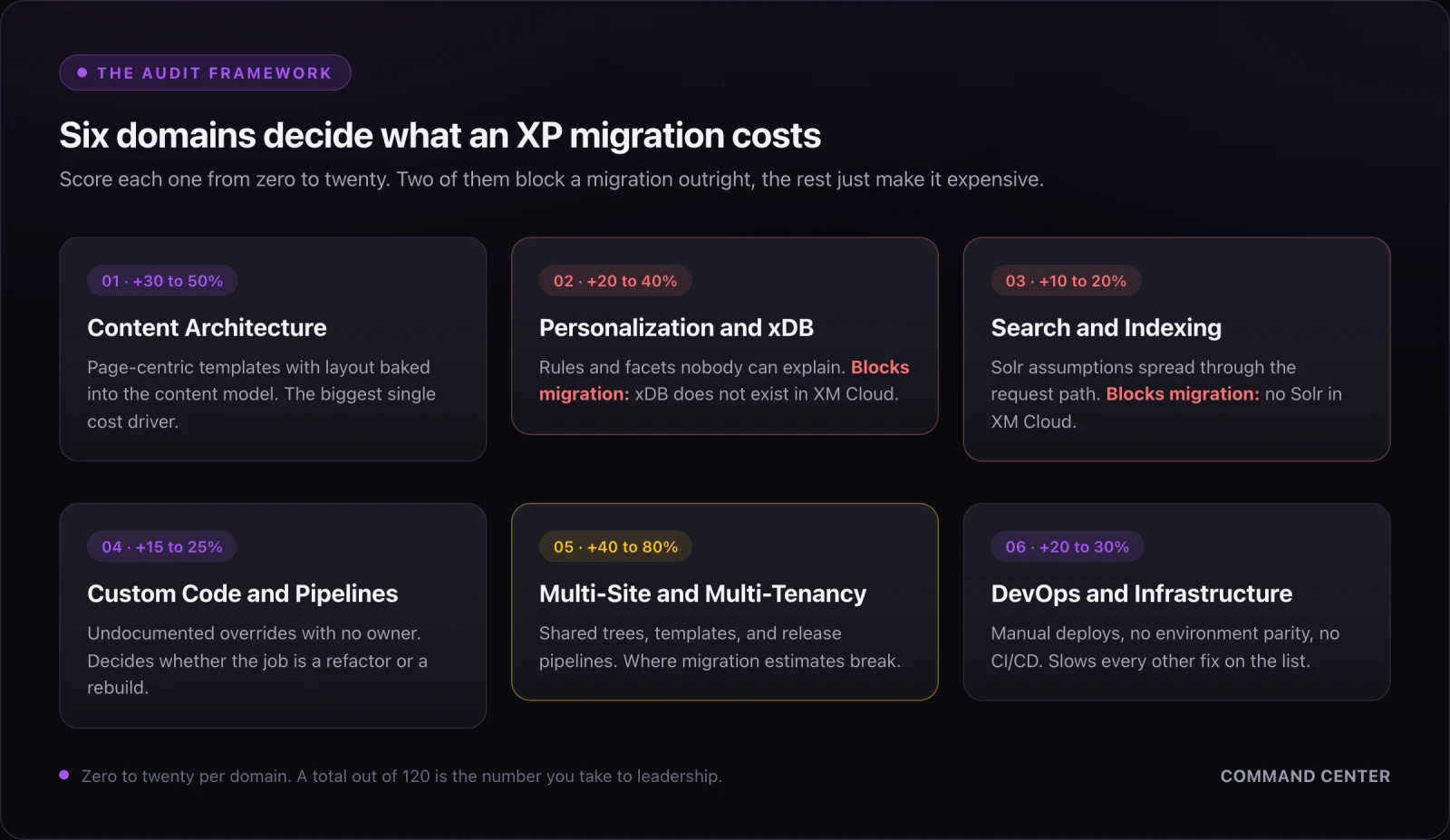
Two of the six block a migration outright, because XM Cloud has no xDB and no Solr. The other four decide what it costs. Each one closes with the signal that pushes it into high-risk territory, so you can score your own installation as you read.
Domain 1: Content Architecture
Content modeling is the number one driver of migration cost, and it is the domain where I see the widest gap between what a site looks like on the surface and what it actually costs to move. In my audits, I often find:
- Deeply nested content trees that no longer map to how the business is organized
- Page-centric templates instead of component-centric models
- Presentation details hard-coded into templates
- Lack of reusable components
- No separation between content and layout
- Content structures not ready for headless delivery
This debt accumulates quietly. A site launches with a clean structure, then years of campaigns and one-off landing pages get bolted on wherever there was room in the tree. Nobody sets out to build a content model this way; it happens one urgent request at a time.
Why it matters: Poor content architecture multiplies migration cost because every content item must be restructured, remapped, or rebuilt rather than lifted and shifted. A headless front end expects components with well-defined fields, not templates that mix layout markup into the content model. When I score this domain high risk, the fix is rarely a quick cleanup: it is a content model redesign, a migration script, and author retraining, three workstreams hiding inside what looks like one line item on a project plan.
What I look for in an audit: I sample content across every site section, not just the homepage tree, because debt concentrates where leadership stops paying attention after launch. Campaign landing pages, legacy microsites, and anything built under deadline pressure are the first places I check. Those areas usually account for a disproportionate share of the migration estimate.
Scores 15 or higher when: templates carry presentation markup, the same component is rebuilt per section, and no one can point to a reusable field model.
Domain 2: Personalization and xDB
Many XP implementations have personalization rules that were created years ago and never revisited. I often find:
- Hundreds of unused or outdated personalization rules
- Custom xDB facets that nobody currently maintaining the site can fully explain
- Legacy engagement plans
- Marketing automation that no longer runs
- Goals, campaigns, and outcomes that are unused or misconfigured
I have audited installations where fewer than ten percent of the active personalization rules were still doing anything measurable. The rest were dead weight, left in place because nobody wanted to be the one who deleted a rule that might matter. That instinct is understandable, and it is exactly how xDB debt compounds over a decade.
Why it matters: xDB is not part of XM Cloud. Any dependency on xDB becomes a migration blocker, not a migration inconvenience. Before you can move, someone has to inventory every rule, facet, and engagement plan, decide what still reflects current business goals, and rebuild the ones worth keeping on a modern personalization layer. Skipping that inventory does not make the debt disappear. It just moves the discovery to the middle of the migration, where it is far more expensive to deal with.
What I look for in an audit: ownership is the real signal here. For every active rule, I ask who owns it on the marketing side and whether that person could explain what it does without looking it up. Rules nobody can explain are candidates for retirement, not migration, and retiring them before the audit closes shrinks the personalization rebuild considerably.
Scores 15 or higher when: custom xDB facets are in play, engagement plans still run, and no marketer can name the owner of an active rule.
Domain 3: Search and Indexing
Search is one of the most fragile parts of XP. I regularly encounter:
- Custom Solr schema modifications
- Multiple index rebuild dependencies that no one wants to touch
- Custom computed fields
- Search logic embedded directly in controllers
- No abstraction layer between the application and the search engine
Search debt tends to be invisible until something breaks: a schema change in one part of the site cascades into a rebuild that takes down search elsewhere, because the two were never meant to be independent.
Why it matters: Solr is not part of XM Cloud. Custom search logic must be rewritten or replaced, and the amount of rework scales directly with how tightly search was coupled to the rest of the application. A site with a clean abstraction layer over search can usually swap in a cloud search provider with moderate effort. A site with search logic scattered across controllers and computed fields requires a much closer audit, because nobody can say with confidence what will break when the underlying engine changes.
What I look for in an audit: I trace a handful of real search queries end to end, from the search box to the index to the result. That trace usually reveals how many layers a query passes through and how many of those layers assume Solr specifically, rather than search in the abstract. The more Solr-specific assumptions I find baked into the request path, the higher this domain scores, and the more time I budget for the search rewrite in any migration plan.
Scores 15 or higher when: controllers query Solr directly, computed fields carry business logic, and a schema change forces a full rebuild.
Domain 4: Custom Code and Pipelines
Custom code is often the largest source of XP technical debt. I frequently see:
- Custom pipelines overriding core Sitecore behavior
- Processors with no documentation and no clear owner
- Legacy MVC controllers doing work that belongs in services
- Hard-coded dependencies on specific server paths or configuration values
- No dependency injection
- No abstraction for external services
This is the domain where I spend the most audit time, because it is the hardest to assess from the outside. A pipeline override might be a two-line tweak or it might be load-bearing for half the site's functionality, and you often cannot tell which until you try to remove it.
Why it matters: Custom code determines whether migration is a refactor or a full rebuild. Well-documented, cleanly separated custom code can often be ported with real effort but a clear path. Undocumented pipeline overrides and processors with no owner have to be reverse-engineered before anyone can safely decide whether to keep, rewrite, or drop them. That reverse-engineering work is what quietly turns a fixed-bid migration proposal into a change order three months in.
What I look for in an audit: I ask for the pipeline configuration files first, before touching any code, and compare them against out-of-the-box Sitecore to see how much has been overridden. A handful of documented overrides is a very different migration than a pipeline rewritten with no record of why, and that difference is often the single biggest swing factor in a migration estimate, since it decides whether the custom code domain scores as a refactor or a rebuild.
Scores 15 or higher when: pipeline overrides are undocumented, no dependency injection exists, and removing a processor is something nobody will risk.
Domain 5: Multi-Site and Multi-Tenancy
Many XP installations have grown organically into multi-site platforms. Common issues include:
- Shared content trees across brands
- Shared templates across unrelated sites
- No tenant isolation
- Cross-site dependencies in rendering code
- Shared media libraries with no ownership boundaries
- Shared deployment pipelines that force every site to release together
Multi-site debt is different from the other five domains, because it is architectural rather than purely technical. You cannot fix it with a refactor. You have to decide, as an organization, which sites actually need to be independent and which ones were only sharing infrastructure because it was convenient at the time, often years before anyone currently on the team was involved in the decision.
Why it matters: Multi-site complexity adds forty to eighty percent to migration cost and timeline on its own, more than any other single domain, and it stacks on top of content and pipeline debt rather than replacing them. Separating tightly coupled sites means untangling shared templates, splitting media libraries, and rebuilding deployment pipelines so that one brand's release no longer depends on another's. This is consistently the domain where initial migration estimates go furthest off track, because the coupling is invisible until someone tries to move one site without the other four.
What I look for in an audit: I ask each brand or site owner, separately, which other sites they believe depend on theirs. The gap between what they think is shared and what is actually shared in code is usually significant, and that gap is a good predictor of how much the migration estimate will move once engineering starts untangling it. When three site owners give three different answers to the same question, that alone is a high-risk signal.
Scores 15 or higher when: brands share templates and media libraries, and one site cannot ship a release without the others going with it.
Domain 6: DevOps and Infrastructure
XP's infrastructure footprint is often outdated. I regularly find:
- Manual deployments run by a specific person who knows the steps
- No CI/CD pipeline
- On-prem hosting with no path to cloud
- Outdated Windows Server or SQL Server versions
- No containerization
- No automated testing
- No environment parity between staging and production
DevOps debt does not directly block migration the way xDB or Solr dependencies do. It does something arguably worse: it slows down every other fix on this list. Teams without CI/CD or environment parity cannot safely test the content model changes, search abstraction, or code refactors that the other five domains require, so remediation stalls across the board rather than in one place.
Why it matters: Infrastructure debt is the silent killer of XP longevity. It is also the domain most enterprises can start fixing immediately, independent of any migration decision. Standing up CI/CD, containerizing the application, and getting staging and production into parity does not require touching xDB, Solr, or custom pipelines at all. It just requires deciding to do it, which is why I recommend most organizations start their remediation here.
What I look for in an audit: the fastest signal is asking how a deployment actually happens today. If the honest answer involves a specific person, a checklist in a shared document, and a maintenance window, that tells me more about overall modernization readiness than almost anything else in the audit, because it usually predicts the maturity of every other domain too.
Scores 15 or higher when: deployment depends on one person, staging and production have drifted, and there is no automated test to catch the difference.
Scoring It: 120 Points Across Six Domains
Score each of the six domains from zero to twenty, where zero is clean and twenty is severe. Add the six scores for a total out of 120.
| Total | Band | What it means for the business |
|---|---|---|
| 0 to 24 | Low | Modernize on your own schedule |
| 25 to 48 | Moderate | Remediate the top two domains before scoping a migration |
| 49 to 72 | High | Budget for remediation as its own project, not a migration line item |
| 73 to 96 | Critical | Any fixed-bid migration quote at this level will move |
| 97 to 120 | Migration-blocking | Remediate first. Migrating now converts debt into overrun |
This scorecard gives leadership a clear, quantifiable view of XP posture, and because every domain uses the same scale, it also shows which domain to fund first.
You do not have to build the sheet yourself. The Sitecore XP Technical Debt Scorecard is the working version of this framework: every indicator below as a scored row, the total and band calculated for you, and a worked example of a real installation so you can see what a finished audit looks like before you start your own.
What Each Domain Adds to the Migration Bill
These are the ranges I have observed across enterprise modernization projects, not published industry benchmarks. Each figure is what that domain adds on its own, so read them as additive multipliers rather than a menu to pick from:
| Debt source | Adds on its own | Why it lands there |
|---|---|---|
| Content modeling | +30 to 50% | Every item is restructured, not moved |
| Multi-site complexity | +40 to 80% | Untangling shared templates, media, pipelines |
| xDB dependencies | +20 to 40% | Rules and facets rebuilt on a new layer |
| DevOps debt | +20 to 30% | Slows every other remediation stream |
| Custom pipelines | +15 to 25% | Reverse-engineering before any decision |
| Solr customizations | +10 to 20% | Search rewritten against a new engine |
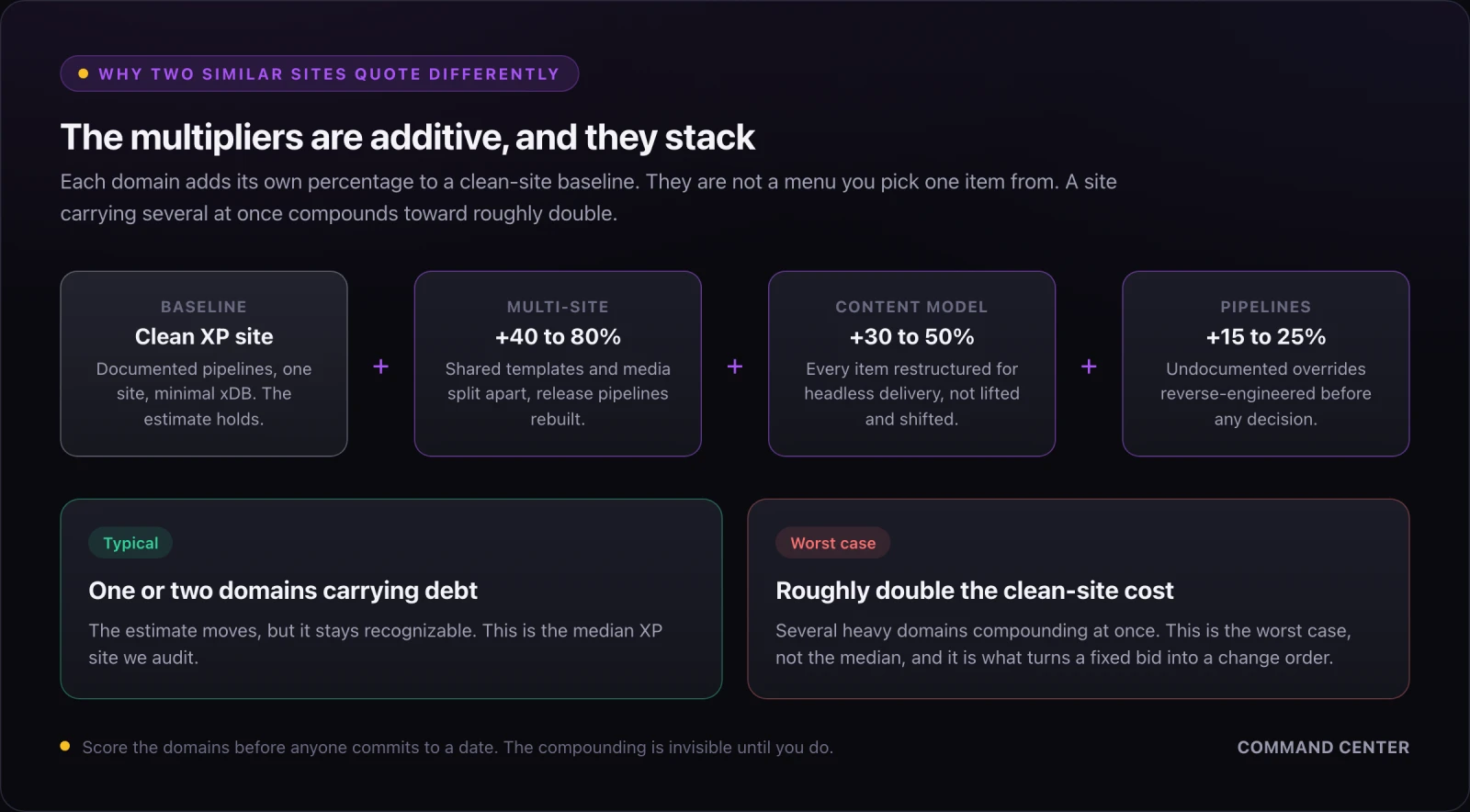
They also compound. A site carrying heavy multi-site, content modeling, and pipeline debt at the same time can land at roughly double a clean-site estimate, occasionally worse. That is the worst case rather than the median, and it is why two XP sites of similar size can quote very differently.
Cutting Debt Without Committing to a Migration
Enterprises can reduce technical debt today without committing to migration. In my audits, I often recommend:
- Introducing headless front ends such as Next.js and Vercel (see this headless vs. traditional CMS breakdown if you haven't settled on the architecture)
- Externalizing personalization and replacing Solr with cloud search
- Introducing dependency injection and abstraction layers
- Cleaning up content models and removing unused xDB features
- Introducing CI/CD and containerizing XP
- Documenting pipelines and processors
This roadmap extends XP's life while preparing for future modernization. If the remediation list runs longer than your team can absorb alongside its normal roadmap, our Sitecore services cover the audit and the remediation work itself.
The Seven-Question Readiness Check
If you do nothing else from this article, answer these seven questions with your engineering lead in the room. Every "no" is a number on your migration invoice.
| # | Ask your team | A "no" means |
|---|---|---|
| 1 | Is content headless-ready? | Content model redesign, migration scripts, author retraining |
| 2 | Are personalization rules documented? | An inventory project before anyone can scope the rebuild |
| 3 | Is xDB usage minimal? | A migration blocker, not an inconvenience |
| 4 | Are pipelines documented? | Reverse-engineering, and a fixed bid that will not hold |
| 5 | Is search abstracted? | A search rewrite scoped blind |
| 6 | Is multi-site isolated? | The single largest swing factor in the estimate |
| 7 | Is DevOps automated? | Every other fix on this list gets slower |
How to read your answers: one or two "no" answers is a normal, healthy backlog. Four or more, and remediation is its own project with its own budget, not a workstream you can hide inside a migration. Score the six domains properly before anyone commits to a date.
XP Isn't the Problem, Technical Debt Is
XP remains a powerful platform, and a well-run installation can still serve an enterprise well. What determines whether modernization is smooth or painful is technical debt, not the platform. A structured audit gives organizations clarity, reduces migration cost, and ensures future modernization, to an enterprise headless CMS like XM Cloud or elsewhere, is strategic rather than reactive.
The organizations that succeed over the next few years will be the ones that understand their debt now and reduce it before migration turns urgent.
Further reading
This piece is adapted, with permission, from David Walker's The Sitecore XP Technical Debt Audit, which goes deeper into the audit framework. If you're weighing whether to migrate at all, Enterprise CMS in 2026: How to Choose the Platform and the Partner covers the platform-and-partner decision behind every modernization call. Custom pipeline debt is what shows up when a Sitecore build's delivery goes wrong, and the Figma-to-Sitecore component library rebuild playbook walks through fixing it after the fact. For teams evaluating XM Cloud, Enterprise Headless CMS, Explained breaks down what "enterprise" adds on top of "headless."
Frequently asked questions
What is a Sitecore XP technical debt audit?
It is a structured review that scores six domains of a Sitecore XP installation: content architecture, personalization and xDB, search and indexing, custom code and pipelines, multi-site complexity, and DevOps maturity. Each domain scores zero to twenty, for a total out of 120. The result tells leadership how ready the platform is to modernize and which domain to fund first.
How much does a Sitecore XP to XM Cloud migration cost?
There is no single number, because technical debt drives the estimate more than the platform does. Across the audits behind this framework, content modeling debt added thirty to fifty percent on its own, multi-site complexity forty to eighty percent, and xDB dependencies twenty to forty percent. Those are additive and they stack, so a site carrying several at once can reach roughly double a clean-site estimate in the worst cases.
What is Sitecore XM Cloud, and how is it different from XP?
XM Cloud is Sitecore's SaaS content management platform, built for headless delivery. XP is the self-hosted Experience Platform, which you run and patch yourself across CM, CD, SQL, Solr, xConnect, and Identity servers. The practical difference for a migration is that XM Cloud has no xDB and no Solr, so any dependency on either has to be rebuilt rather than moved.
How do I upgrade Sitecore without migrating to XM Cloud?
Most of the highest-value remediation does not require a migration decision at all. Stand up CI/CD, containerize the application, get staging and production into parity, document your pipelines and processors, and retire personalization rules nobody can explain. That work reduces debt, extends the life of the current installation, and shrinks the migration when you do commit to one.
Do I have to leave Sitecore XP?
Not immediately. A well-run XP installation can still serve an enterprise well. What forces the decision is the cost curve: infrastructure spend, a shrinking XP talent pool, and security expectations XP was never designed to meet. Auditing your debt now means the move happens on your schedule rather than during an outage or a failed compliance review.
Tools
Grab the tool and fix this yourself. Open the tool for install steps, the download, and the source.
Proven Builder, Director, Leader and Manager of Practices, Products, Programs, Software, Solutions, and Teams
30 years experience as a Software Engineer/Lead/Architect with diverse industry experience: Banking, eCommerce, Healthcare, and SaaS/startups. As a former Senior Application Development Manager at Microsoft for 3 1/2 years with numerous hands-on Manager and Director level roles, I know I can solve any devops, software, automation, or organization challenge.