Headless CMS Security: The Real Attack Surface
A headless CMS is secure when you treat it as one, but decoupling moves the attack surface to the seams: API tokens, preview endpoints, webhooks, edge caching, rich-text XSS, RBAC, and front-end secrets. Here is the real surface and a hardening checklist.


The short answer
Headless CMS security is mostly about the seams between content management and delivery: API token scoping, preview endpoints, webhook verification, edge cache leaks, rich-text XSS, RBAC, and secrets in the front-end build. Headless is not less secure than a monolith, it has a wider, flatter attack surface with predictable failure points. This guide walks each one, grounded in our work on regulated properties, and ends with a hardening checklist.
Is a headless CMS secure? Yes, when you treat it as one, but a headless setup moves the attack surface to places a traditional CMS never had. Headless CMS security is mostly about the seams: the API tokens between your front end and the content API, the preview endpoints that expose drafts, the webhooks that trigger builds, the edge cache that can leak one user's authenticated content to another, and the rich-text fields that let an author inject a script. None of these exist in a monolith the way they exist here, because in a monolith the CMS renders the page and the whole thing lives behind one login. Split content management from delivery and you create a set of trust boundaries that each need their own defense.
We build server-side rendered (SSR) front ends on this model constantly, including on regulated pharma properties where the security posture is contractual rather than aspirational. Our AI-code rescue work has taught us exactly how these front ends leak secrets in practice. This guide walks the real attack surface of a decoupled CMS, the headless CMS security best practices that actually move the needle, and a hardening checklist you can run against your own build.
What is genuinely different about headless CMS security?
In a traditional CMS or digital experience platform, content management and content delivery are the same application. Authentication, rendering, and data access all sit behind a single boundary. When you go headless, you break that into at least three moving parts: the CMS (where content lives and authors log in), the content API (how the front end reads that content), and the front end itself (which renders and often runs at the edge). Each connection between those parts is a place where a token, a header, or a cached response can go wrong.
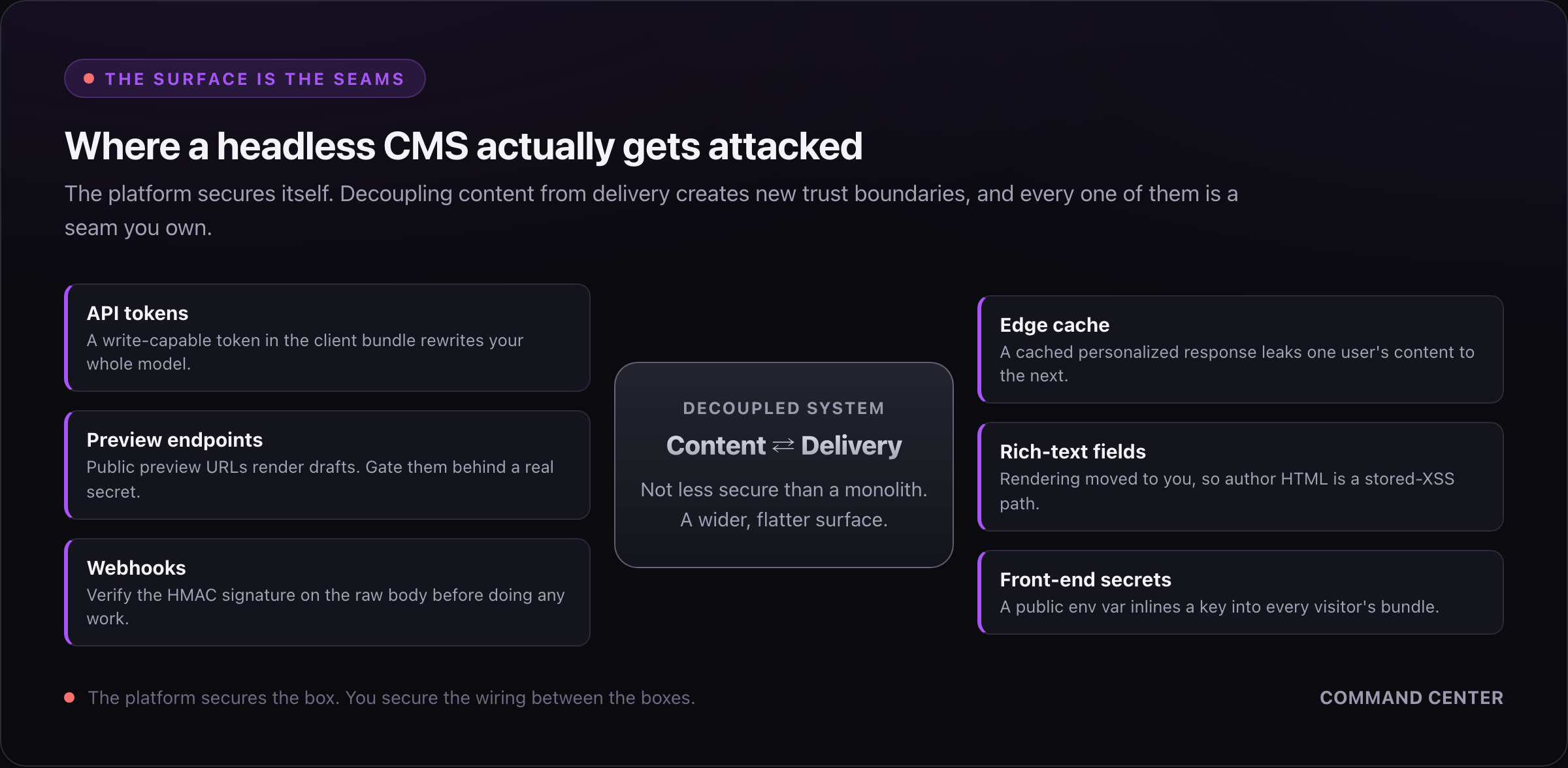
That is the whole story. Headless is not less secure than a monolith. It has a wider, flatter attack surface with more public edges, and the failures cluster in a predictable set of places. The teams that get burned are the ones who assumed "the CMS vendor handles security" and never audited the seams they own. The vendor secures their platform. You secure the wiring.
How should you scope headless CMS API tokens?
This is the single most common headless CMS API security mistake, and it is almost always the same one: shipping a token to the browser that can do more than read published content.
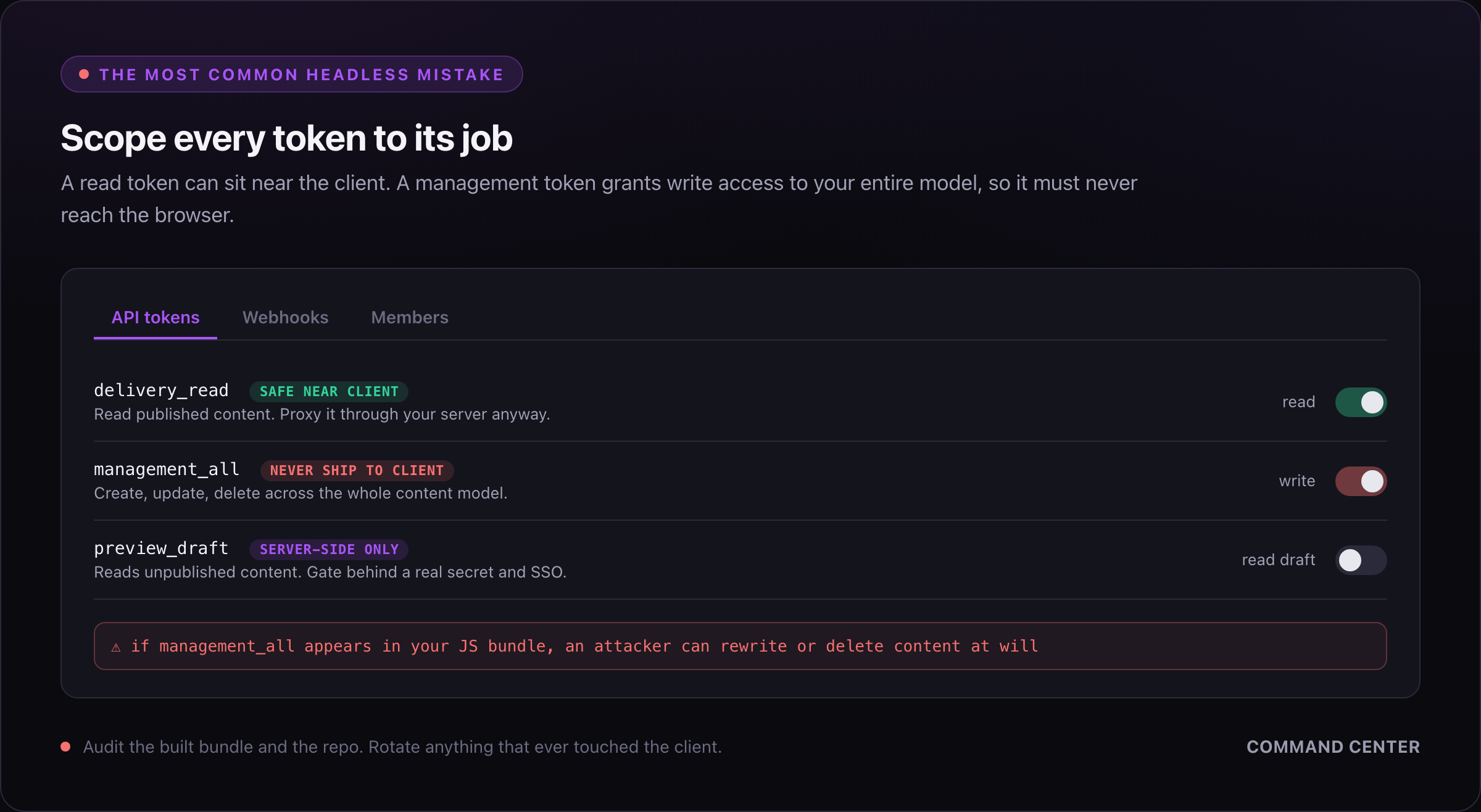
Most headless platforms issue at least two classes of token, and the naming varies but the shape does not:
| Token type | What it can do | Where it belongs |
|---|---|---|
| Read / delivery / CDN token | Fetch published content only | Can be public-ish, but prefer server-side |
| Preview / draft token | Fetch unpublished drafts | Server-side only, never the browser |
| Management / content / personal access token | Create, update, delete content and schema | Server-side, CI, and admin tooling only, never anywhere near the client |
The rule that prevents the worst incidents: a management token must never reach the client bundle, a browser network request, or a public repository. A management token is write access to your entire content model. If it leaks, an attacker can rewrite or delete content, exfiltrate everything, and in some platforms alter the schema itself. Read tokens leaking is a much smaller problem (they see what is already public), but management tokens leaking is a breach.
The subtle version of this bug is scoping by habit. A developer grabs the management token during local development because it "just works" for every call, wires it into the front-end data layer, and never swaps it for a read token before shipping. Now a write-capable credential is one view-source away. When we audit a headless build, checking which token class each front-end fetch actually uses is the first thing we do, because it is the highest-severity, lowest-effort finding.
Least privilege is the whole game here. If a token only ever reads published content, issue a read token. If a build step needs to write, give CI its own scoped token, stored as a CI secret, rotated on a schedule, and never reused by the running app. One token per job, scoped to exactly that job.
Are preview and draft endpoints an exposure?
Yes, and they are easy to forget because they work fine in testing. Preview mode exists so authors can see unpublished content, which means it deliberately bypasses the "published only" filter. If the endpoint that enables preview is not protected, anyone who finds the URL can read your drafts: unannounced products, embargoed press, pricing you have not launched, content still under legal review.
The failure mode we see most is a preview route guarded by a secret in the query string that then gets logged, cached, or shared in a Slack message and never rotated. Treat the preview secret like any other credential. It should be a real secret, checked server-side, and rotated when someone with access leaves. The preview endpoint should set Cache-Control: no-store so a preview response never lands in a shared cache. On regulated properties we go further and require the preview session to sit behind the same single sign-on (SSO) as the CMS itself, so a leaked link alone is not enough.
Why does webhook signature verification matter?
Headless builds lean on webhooks: the CMS fires an event when content changes, and your front end (or your host) rebuilds or revalidates the affected pages. The problem is that a webhook receiver is a public endpoint by definition. The CMS has to be able to reach it, which means anyone else can too.
If you act on a webhook without verifying it came from your CMS, an attacker can forge those requests. Depending on what the handler does, that ranges from annoying (triggering thousands of rebuilds to burn your build minutes and rack up cost) to serious (poisoning your cache with stale or attacker-chosen content, or hitting an internal revalidation route that trusts its input).
The fix is signature verification, and every serious headless platform supports it. The CMS signs the payload with a shared secret (usually a hash-based message authentication code, or HMAC, in a header), and your handler recomputes the signature and compares before doing any work. A minimal Nitro handler looks like this:
import { createHmac, timingSafeEqual } from 'node:crypto'

export default defineEventHandler(async (event) => {
  const signature = getHeader(event, 'x-cms-signature') ?? ''
  const raw = await readRawBody(event)
  const expected = createHmac('sha256', process.env.CMS_WEBHOOK_SECRET!)
    .update(raw ?? '')
    .digest('hex')

  const a = Buffer.from(signature)
  const b = Buffer.from(expected)
  if (a.length !== b.length || !timingSafeEqual(a, b)) {
    throw createError({ statusCode: 401, statusMessage: 'Bad signature' })
  }
  // Only now do the work: revalidate, rebuild, invalidate cache.
})
Two details people miss: verify against the raw body, not the parsed JSON (re-serializing changes bytes and breaks the HMAC), and use a constant-time comparison so you are not leaking the secret through timing. If your platform cannot sign webhooks, put the receiver behind a secret path plus an allowlist of the CMS egress IPs, but signatures are the right answer.
How does edge caching leak authenticated content?
This is the headless failure that scares us the most, because it is invisible in testing and catastrophic in production. Headless front ends love the edge: SSR responses cached at a content delivery network (CDN) are how you get a fast, globally distributed site. But a CDN caches by URL (and whatever you tell it to vary on), and it does not know which bytes are personal.
The classic incident: a page renders content personalized to the logged-in user (their name, their account balance), the CDN caches that response, and the next visitor to the same URL gets served the first user's page. Now you have leaked one customer's data to another, which on a regulated property is a reportable breach, not a bug.
The defenses are specific:
- Any response containing per-user or authenticated content must set
Cache-Control: private, no-store(or the equivalent), so shared caches never hold it. - If a response varies by anything (auth state, locale, cookie), it must declare that with a correct
Varyheader, or the cache key must include it. A response that varies by cookie but does not say so is the bug. - Keep the personalization boundary explicit. Cache the public shell aggressively and hydrate the personal parts client-side from an authenticated call, rather than baking user data into a cacheable SSR response.
- Never let a preview or draft response be cacheable at the edge.
We treat "does any cached route ever contain authenticated content" as a mandatory review question on every SSR build, because the cost of getting it wrong is measured in disclosure notices.
Can rich-text fields cause stored XSS?
Yes, and headless makes it slightly worse than a monolith. Rich-text and structured fields let authors write HTML, or the CMS serializes their formatting into markup your front end renders. If your front end takes that content and drops it into the DOM with the framework's raw-HTML escape hatch (v-html in Vue, dangerouslySetInnerHTML in React), then any script an author (or an attacker who compromised an author account) puts in that field runs in every visitor's browser. That is stored cross-site scripting (XSS), and it is one of the oldest CMS vulnerabilities that headless quietly reintroduces.
The reason it is worse in headless is the trust assumption. In a monolith the CMS often sanitizes on the way out because it owns rendering. In headless the CMS hands you a blob and rendering is your job, so the sanitization responsibility silently transfers to the front end, and teams frequently do not notice the handoff.
The defenses, in order:
- Prefer structured content over raw HTML. If a field is a portable-text or block structure that you render through a known component map, an author cannot inject a
<script>because there is no path from data to arbitrary markup. - When you must render author HTML, sanitize it server-side with a real allowlist sanitizer before it reaches the template. Do not rely on the framework to escape it, because the whole point of
v-htmlis that it does not. - Set a Content Security Policy that disallows inline script. A strong CSP turns a stored-XSS payload from a compromise into a blocked console error, and it is cheap on an SSR front end where you control the response headers.
What does least-privilege RBAC look like in the CMS?
Everything above is the wiring. Role-based access control (RBAC) is the CMS itself, and it is where insider risk and account compromise are contained. The principle is boring and correct: no human or token has more access than their job requires.
In practice that means editors can edit the content types they own and nothing else. Only a small set of people can publish. Schema and model changes are locked to developers, and management-token access is separate from everyday author logins. On the regulated properties we deliver, this is not optional. It is an audit requirement, and we map roles to a documented approval matrix so "who can publish to production" has a name next to it.
The two mistakes we see: one shared admin login that everybody uses (which destroys your audit trail and turns offboarding a single person into rotating a credential everyone depends on), and role sprawl where "editor" quietly accumulated publish and schema rights because it was easier than making a new role. Both are the same failure of least privilege. Enforce SSO so CMS accounts are tied to real identities you can revoke centrally, require multi-factor authentication (MFA), and review the role assignments on a schedule rather than never.
How do secrets leak in the front-end build?
This is where our AI-code rescue work has taught us the most, because it is the single most common way we find a live credential exposed. The pattern is always some version of the same misunderstanding: the developer put a secret in an environment variable, but named it or referenced it in a way that inlined it into the client bundle.
Every front-end framework has a public/private split for env vars, and it is easy to get on the wrong side of it. In Nuxt, runtimeConfig.public is shipped to the browser and runtimeConfig (private) stays on the server. A management token dropped into the public config, or a NUXT_PUBLIC_-prefixed variable, is now in the JavaScript every visitor downloads. In Next it is the NEXT_PUBLIC_ prefix. Same trap, different name. The build succeeds, the site works, and the credential is sitting in plain text in a bundle anyone can read.
AI-generated code walks straight into this because the models optimize for "make it work," and putting the token where the client fetch can see it makes the fetch work. It is the same root cause as the accessibility problem we wrote up in AI-generated UI components fail WCAG 2.2: AI code skips the server-side, invisible-in-a-demo layer, whether that layer is a keyboard handler or a token boundary. The generated code renders correctly and ships a write-capable credential to the browser, and nobody notices until an audit or an incident.
The discipline that prevents it:
- Keep every secret server-side by default. A token only becomes public when you have a specific, examined reason, and a delivery read token is usually the only thing that qualifies.
- Proxy sensitive CMS calls through your own server routes so the token never leaves the server, rather than calling the content API directly from the browser with a token attached.
- Scan the built client bundle for anything that looks like a token before you ship, and add a secret scanner to CI so a committed key fails the build.
- Assume any secret that ever touched the client is compromised and rotate it, do not just remove it.
A headless CMS security hardening checklist
Run this against any decoupled build before you call it production-ready. Each item maps to one of the seams above.
- Audit every token by class. Confirm no management or write-capable token appears in the client bundle, a browser request, or the repo. Only a read/delivery token may be near the client, and prefer proxying even that.
- Lock down preview. Protect the preview endpoint with a real server-side secret, set preview responses to no-store, rotate the secret on access changes, and gate preview behind SSO on sensitive properties.
- Verify every webhook. Check the HMAC signature against the raw body with a constant-time compare before the handler does any work, and reject anything unsigned.
- Prove the cache never serves authenticated content. Mark per-user and preview responses private/no-store, set correct Vary headers, and keep personalization client-side of the cache boundary.
- Close the XSS path. Render structured content through a component map, sanitize any author HTML server-side with an allowlist, and ship a CSP that blocks inline script.
- Enforce least-privilege RBAC. Real per-identity logins over SSO with MFA, publish and schema rights limited to named roles, no shared admin account, and a scheduled role review.
- Keep secrets server-side. Audit the public/private env split, proxy sensitive calls, scan the bundle and CI for leaked keys, and rotate anything that ever touched the client.
None of these are exotic. They are the boring, seam-by-seam discipline that turns a headless CMS from a wider attack surface into a well-defended one. The teams that skip them are not choosing insecurity on purpose. They are assuming the platform covers ground it does not.
If you are standing up a headless build on a regulated or high-traffic property and want the wiring audited before it ships, that is the work we do. We run the same review on Sitecore XM Cloud headless front ends and on modern JavaScript builds, because the seams are the same wherever the content comes from.
Read next
- Enterprise CMS in 2026: How to Choose the Platform and the Partner: the pillar this article sits under, covering the platform and partner decision end to end.
- Headless CMS SEO: The Complete Guide: the other half of getting a decoupled front end right, where SSR meets discoverability.
- Headless CMS vs Traditional CMS: the architectural trade-off behind every seam in this article, laid out side by side.
- AI-Generated UI Components Fail WCAG 2.2: the same "AI skips the invisible layer" failure, applied to accessibility.
- Work with us: our headless CMS agency practice, or Sitecore development and support for headless XM Cloud builds.
Frequently asked questions
Is a headless CMS secure?
Yes, when you treat it as one. Headless is not less secure than a monolith, but it has a wider attack surface. Splitting content management from delivery creates new trust boundaries: API tokens, preview endpoints, webhooks, and edge caches. The platform secures itself, but you secure the wiring between the parts.
What is the most common headless CMS API security mistake?
Shipping a write-capable token to the browser. Delivery read tokens can sit near the client, but management or content tokens grant write access to your entire model. If one leaks into the client bundle or a browser request, an attacker can rewrite or delete content at will. Scope every token to its job.
Can a headless CMS leak one user's content to another?
Yes, through edge caching. A content delivery network caches responses by URL and does not know which bytes are personal. If a personalized server-rendered response gets cached, the next visitor to that URL sees it. Mark authenticated responses private and no-store, set correct Vary headers, and keep personalization client-side of the cache.
How do secrets leak in a headless front-end build?
Through the public versus private environment variable split. A token placed in Nuxt runtimeConfig.public or behind a NEXT_PUBLIC_ prefix gets inlined into the JavaScript every visitor downloads. The build succeeds and the site works, so nobody notices. Keep secrets server-side, proxy sensitive calls, and scan the bundle before shipping.
Why do rich-text fields cause stored XSS in headless setups?
Because rendering moves to your front end. In a monolith the CMS often sanitizes on output. In headless the CMS hands you a blob and you render it, so if you use v-html or dangerouslySetInnerHTML on author content, any injected script runs for every visitor. Prefer structured content, sanitize server-side, and ship a strict Content Security Policy.
Founder & Software Engineer
Obsessed with building top-tier web software and crafting unique, polished user experiences.